Need Help?
We're here for you. Join our Discord community for the fastest response, or drop us an email and we'll get back to you within one business day.
Fastest support — chat with the team and community
Join our DiscordPrefer email? We aim to reply within one business day
[email protected]What is JamQpro?
JamQpro is a digital jam night management platform for musicians, organizers, and venues. Instead of paper sign-up sheets and dry-erase boards, musicians can browse upcoming jam nights, claim a slot, and watch their queue position update in real time — all from the web or the iOS app. Organizers get a live queue dashboard to coordinate their house band and run smooth, well-paced events.
Musician FAQ
How do I sign up for an account?
Signing up is quick and free. Visit jamqpro.com and click Sign Up, or download the JamQpro iOS app and tap Create Account.
- Enter your first and last name, a valid email address, and a secure password.
- Agree to the Terms of Service and tap Create Account.
- Check your inbox for a verification email and click the confirmation link.
- Complete your musician profile — instruments, skill level, genres, and your local search radius.
iOS users: Sign in with the same credentials. Your profile, queue history, and achievements sync automatically.
No credit card or subscription is required to join as a musician.
How do I find a jam night near me?
JamQpro uses your location to surface events within your preferred search radius.
- Set your search radius — in Profile → Musician Settings, choose a Search Radius (e.g. 25 miles).
- Allow location access — grant the app or browser location permission so distances can be calculated.
- If location is unavailable, JamQpro falls back to the zip code saved in your profile.
- Browse the Jam Nights list — events are sorted by date and show venue, city, distance, format, and available slots.
Tap any event to view details, check the live queue, and sign up for a slot.
How can I further secure my account?
JamQpro supports Time-based One-Time Password (TOTP) two-factor authentication.
- Go to Profile → Security.
- Tap Enable Two-Factor Authentication.
- Scan the QR code with an authenticator app (Google Authenticator, Authy, or 1Password).
- Enter the 6-digit code to confirm setup.
- Save your backup codes — they let you recover access if you lose your device.
Once enabled, you'll be prompted for a TOTP code each sign-in.
How do I sign up for a slot at a jam night?
- Tap the event to open its Event Detail page.
- Tap Sign Up (visible when slots are available). Enter your song or set details and select your instruments.
- After signing up, you'll see your live position in the queue, which updates in real time.
- When you're On Deck, you'll receive a push notification to head to the stage.
Need to cancel? Tap Cancel My Slot on the event page. Cancelling early helps organizers keep the queue moving.
Will I be notified when it's my turn to play?
Yes! JamQpro sends a push notification the moment the organizer marks you as On Deck — meaning you're next up to perform.
You'll receive a second push notification when the organizer marks you as Playing — confirming it's your turn on stage.
To ensure you receive alerts, allow JamQpro to send push notifications when prompted on iOS. You can also check your queue position at any time by opening the event in the app.
What are Achievements and how do I earn them?
JamQpro tracks every set you perform and awards achievement badges as you hit milestones:
First Jam
Awarded after completing your very first jam. Your badge design matches your primary instrument.
 Drums
Drums
 Guitar
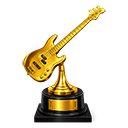 Bass
Bass
 Vocals
 All Others
Performer Milestones
 Bronze
 Silver
 Gold
Gold
 Platinum
 Diamond
There are also special badges for loyalty streaks, and karaoke & open-mic milestones. View your badges under Profile → Achievements.
Is JamQpro free to use as a musician?
Yes — JamQpro is completely free for musicians. Creating an account, browsing events, joining queues, and earning achievements all cost nothing.
JamQpro is currently in public beta, with the iOS app available on the App Store for iPhone (iOS 16+). Android support is planned for a future release.
Organizer FAQ
How do I sign up as an Organizer to host my own events?
During Beta, no approval is needed — anyone can instantly convert to an Organizer account and get a free 30-day trial. This must be done on the website; the iOS app does not support organizer sign-up or billing.
- Create a standard account first at jamqpro.com or via the iOS app.
- On the website, go to Profile → Organizer and click Become an Organizer to activate your free 30-day trial.
- An Organizer section immediately appears in your sidebar with event creation and queue management tools.
Once you're an organizer, you can use the iOS app for all event and queue management. Any subscription-related tasks (upgrades, billing, renewals) must be handled on the website.
How do I create a new event?
- Open Organizer → Manage Events and click Create Event.
- Fill in the title, date & time, event format (Jam Night, Open Mic, or Karaoke), and select the venue.
- Configure queue rules:
- Add your House Band — select members by instrument and mark which roles are open to sit-ins.
- Add tip links (CashApp, Venmo, PayPal) if you'd like to accept tips.
- Set the status to Published to make it visible to musicians searching nearby.
Templates: Save your settings as a template for recurring nights. Next time, hit Use Template and only change the date.
I don't see my venue listed — how do I create a new venue?
- Navigate to Venues from the sidebar (or go to jamqpro.com/venues/).
- Click Add Venue (available to organizers with an active subscription).
- Enter the venue's name, address, city, state, and zip code. The address is used to calculate distances for musicians searching nearby.
- Submit — the venue is now selectable when creating your events.
If a venue already exists and needs to be claimed, contact [email protected].
Once my event is created, how do I manage the queue?
Set your event to Active in the dashboard to unlock the Live Queue view. From there:
Musicians watching on their phone see queue updates in real time — they'll get a push notification when they move to On Deck.
Which options are available to help manage my jam night?
- Max Slots — cap total sign-ups to prevent overbooking.
- Songs per Sign-Up — limit how many songs each performer can list.
- Re-queue Option — lets performers who've played rejoin the queue for another round.
- Cooldown Period — minimum wait time before a performer can re-queue, keeping rotation fair.
- House Band — flag whether a house band is available to back performers.
- Event Format — Jam Night, Open Mic, or Karaoke sets expectations for browsing musicians.
- Queue Close Controls — manually close sign-ups at any point from the live dashboard.
Can I advertise tip links on my event?
Yes! Tip links are displayed directly on your event page. Supported platforms:
- 💵 CashApp
- 💸 Venmo
- 🅿️ PayPal
When creating or editing your event, paste your tip link or handle into the corresponding field.
Any other tips for running a great jam night?
- Publish early — give musicians time to find your event and sign up before the night begins.
- Use On Deck notifications — marking someone On Deck sends a push alert so they arrive at the stage on time.
- Set max slots — capping sign-ups prevents the night from running over.
- Enable re-queue with a cooldown — keeps rotation fair if regulars want multiple turns.
- Check the Analytics tab — review attendance trends and queue flow after each event.
- Join our Discord — connect with other organizers and get early access to new features at discord.gg/UQqSfR9D.
Known Issues & Beta Limitations
- Beta period: JamQpro is currently in a public beta. Some features are still in development.
- Payments: The platform is free for 30 days — no billing information required to start. You can upgrade to a paid plan at any time during your trial.
- iOS app: Requires iOS 16 or later. Android support is not yet available.
- Venue setup: When signing up as an organizer, you can create a venue immediately if it does not already exist — no manual review required. If your venue already exists in the system, you can start hosting events right away.
Have a bug to report or a feature request? Drop it in #bug-reporting or #feature-requests on Discord or email [email protected].